For Loop Action
For Loop Action indicates the start of an execution loop that repeats until the condition evaluates to false. It combines a condition check and a step expression that is evaluated at each iteration, making it suitable for counter-based or condition-driven loops.
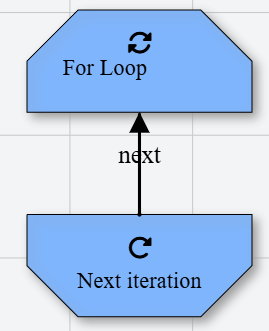
Never use this action without a corresponding Loop Next Action to close the loop.
Appearance
In Talos, For Loop Action appears as a hexagon node with a rotate icon.
Properties
As all Actions, For Loop Action has a few unique properties that are essential for its functionality.
Common properties
Common properties inherited from Action.
By customizing this property, you can differentiate between same type of actions.
This property is Read only and it is not customizable
See more about Talos Scripting language & Expressions
The condition is evaluated at the start of each iteration. The loop continues as long as the condition evaluates to true. When it evaluates to false, the loop terminates.
Examples
${index} < 10
${index} != ${maxIterations}
${list}.Length() > 0
See more about Talos Scripting language & Expressions
This expression is evaluated at the end of each loop iteration, typically used to update the iterator variable.
Examples
${index} = ${index} + 1
${counter} = ${counter} - 1